

i18next
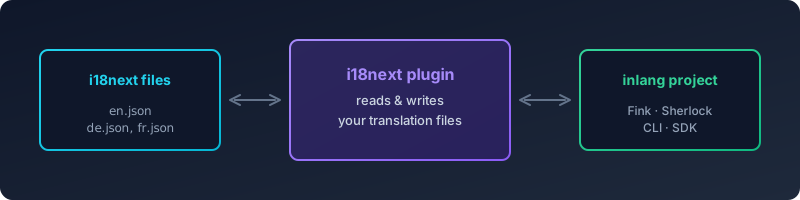
PluginThis plugin enables your inlang project to read and write i18next translation files.
Why use this plugin?
If you're using i18next for internationalization, this plugin lets you:
- Manage translations with Fink – a translation editor for collaborating with translators
- Get inline previews with Sherlock – a VS Code extension that shows translations directly in your code
- Lint translations with inlang CLI – catch missing translations, unused keys, and other issues
- Automate workflows with the inlang SDK – build custom tooling around your translations
How it works
The plugin reads and writes i18next JSON files, preserving your existing file structure (nested or flat keys, namespaces, plurals). It also tells Sherlock how to detect t() function calls in your code so you see inline translation previews.
Supported i18next Features
| Feature | Status | Notes |
|---|---|---|
| Basic key-value pairs | ✅ Supported | Fully working |
| Nested keys | ✅ Supported | Auto-detects flat vs nested structure |
| Variable interpolation | ✅ Supported | {{variable}} with customizable patterns |
| Unescaped interpolation | ✅ Supported | {{- variable}} syntax |
| Formatting | ✅ Supported | Simple format functions like {{value, uppercase}} |
| Formatting with options | ❌ Not supported | {{value, format, option}} will throw an error on export |
| Plurals | ✅ Supported | All forms: _zero, _one, _two, _few, _many, _other |
| Context | ⚠️ Partial | Basic context suffix detection (e.g., key_male) |
| Namespaces | ✅ Supported | Single and multiple namespace configurations |
Nesting ($t()) | ⚠️ Read-only | Recognized but cannot be translated inline |
| Objects/Arrays as values | ✅ Supported | Preserved during roundtrip |
Version Compatibility
- i18next v21+: Full support (uses JSON v4 plural format with
_one,_other, etc.) - i18next v11-v20: Full support
- i18next v1-v10: Limited support (older plural format
_pluralmay need migration)
Installation
- Add this to the modules in your
project.inlang/settings.json - Change the
baseLocaleif needed - Include existing locales in the
localesarray
{
	"baseLocale": "en",
	"locales": ["en", "de"],
	"modules": [
+		"https://cdn.jsdelivr.net/npm/@inlang/plugin-i18next@latest/dist/index.js"
  	],
+	"plugin.inlang.i18next": {
+		"pathPattern": "./resources/{locale}.json"
+  	}
}
Settings
The plugin offers further configuration options that can be passed as arguments. The following settings exist:
type PluginSettings = {
	pathPattern: string | { [key: string]: string }
	variableReferencePattern?: [string] | [string, string]
	sourceLanguageFilePath?: string
}
pathPattern
To use our plugin, you need to provide a path to the directory where your language-specific files are stored. Use the dynamic path syntax {locale} to specify the language name.
pathPattern without namespaces
"plugin.inlang.i18next": {
	"pathPattern": "./resources/{locale}.json"
}
pathPattern with namespaces
"plugin.inlang.i18next": {
	"pathPattern": {
		"common": "./resources/{locale}/common.json",
		"vital": "./resources/{locale}/vital.json"
	}
}
key (prefix): is prefixing the key with a colon
values (path): is the path to the namespace resources
variableReferencePattern
This defines the pattern for variable references. The default is how i18next suggests using placeholders.
default:
"plugin.inlang.i18next": {
	"variableReferencePattern": ["{{", "}}"]
}
sourceLanguageFilePath
This setting is optional and should only be used if the file name of your sourcelocale does not match your pathPattern structure. For example, if your sourcelocale is en but your sourceLanguage file is called main.json, you can use this setting to specify the path to the sourceLanguage file. We recommend renaming the file to en.json and not using this setting.
Without namespaces
"plugin.inlang.i18next": {
	"sourceLanguageFilePath": "./resources/main.json"
}
With namespaces
"plugin.inlang.i18next": {
	"sourceLanguageFilePath": {
		"common": "./resources/main/common.json",
		"vital": "./resources/main/vital.json"
	}
}
In-code usage
t("key")
With namespaces:
t("namespace:key") or t("key", { ns: "namespace" })
To learn about namespaces and how to use translation functions in your code, refer to the i18next documentation. The plugin can parse the code and provide the VS Code extension (Sherlock) with this information.
Expected behavior
Structure and Ordering
The source language file determines the structure for all other locale files:
- Key ordering: Messages are sorted in the order they appear in the source language file
- Nesting vs flat: Detected per-file from the source language. If your
en.jsonuses nested keys, all other locales will use nested keys too - New keys: When you add translations for other locales, they follow the source file's structure
Example
If your source language (en.json) looks like this:
{
  "common": {
    "save": "Save",
    "cancel": "Cancel"
  }
}
Then your target language (de.json) will be written in the same nested structure:
{
  "common": {
    "save": "Speichern",
    "cancel": "Abbrechen"
  }
}
Plural Key Generation
Plural forms are automatically generated with i18next suffixes:
| Input | Generated keys |
|---|---|
Message with count variable | key_one, key_other (minimum) |
| Full plural support | key_zero, key_one, key_two, key_few, key_many, key_other |
The plugin uses the CLDR plural rules for each locale to determine which plural forms are needed.
Limitations
The following i18next features are not supported by this plugin:
| Feature | Limitation |
|---|---|
| Formatting with options | {{value, number(minimumFractionDigits: 2)}} will throw "Not implemented" error on export |
| Inline nesting | $t(key) references are read but cannot be edited or translated inline |
| Postprocessors | Runtime-only feature, not applicable to static translation files |
| Context + Plural combinations | Complex variants may not roundtrip correctly |
| Template literal strings | Only single and double quoted strings are parsed in code |
Custom t function aliases | Only standard t() function calls are detected by Sherlock |
Troubleshooting
"Not implemented" error when saving
Cause: You're using formatting functions with options like {{value, number, minimumFractionDigits: 2}}.
Solution: Simplify to basic formatting {{value, number}} or use plain variables {{value}}. Complex formatting options are not supported.
Keys appear duplicated or out of order
Cause: The source language file structure doesn't match what the plugin expects.
Solution:
- Ensure your source language file (e.g.,
en.json) is valid JSON - Check that the file structure is consistent (all nested or all flat)
- The source language file is the "source of truth" for key ordering
Plurals not working correctly
Cause: Using old i18next plural format or mismatched suffixes.
Solution:
- Use i18next v4 JSON format with suffixes:
_zero,_one,_two,_few,_many,_other - Old format (
key_plural) is not supported - migrate to the new format - Ensure the
countvariable is used in your translation
Sherlock not detecting translation keys
Cause: Non-standard function names or unsupported file types.
Solution:
- Use the standard
t("key")function call syntax - Supported file types:
.ts,.js,.tsx,.jsx,.svelte - For namespaces, use
t("namespace:key")ort("key", { ns: "namespace" })
Nested keys with dots in the key name
Cause: Keys like "my.key.name" are ambiguous - could be nested or a literal dot in the key.
Solution: The plugin handles this automatically using unicode escaping. Keys with literal dots are preserved correctly during roundtrip.
Changes not appearing in target language files
Cause: Target files don't exist or path pattern is incorrect.
Solution:
- Verify your
pathPatternmatches your file structure - Check that the
{locale}placeholder is in the correct position - Directories are created automatically, but the locale must be in your
localesarray
Contributing
Getting started
Run the following commands in your terminal (node and npm must be installed):
npm installnpm run dev
npm run dev will start the development environment which automatically compiles the src/index.ts files to JavaScript (dist/index.js), runs tests defined in *.test.ts files and watches changes.
Recommended complementary solutions

inlang CLI
Automate localization tasks in CI/CD pipelines with machine translation, validation, and plugin support for JSON, i18next, next-intl, and more.

Fink - CAT Editor (Computer Assisted Translation Editor)
Manage translations in a web app with Fink.

Sherlock - VS Code extension
Visualize, edit & lint translated strings at a glance via Inline Decorations & Hover Support, and extract new strings with a single click.

Paraglide JS
Simple, adaptable and tiny i18n library that integrates with any framework